Here is my experience/adventure with PandaBoard trying to use its SPI, GPIO interfaces.
This is a work in progress so, I am documenting as I progress.
GPIO are found @
/sys/class/gpio
and then need to export as root...
#echo "50" > export
# echo "39" > export
# echo "38" > export
# echo "37" > export
# echo "out" >  gpio51/direction
# echo "out" >  gpio50/direction
# echo "out" >  gpio39/direction
# echo "out" >  gpio38/direction
# echo "out" >  gpio37/direction

# echo "1" > gpio38/value
# echo "0" > gpio38/value
# echo "1" > gpio38/value
# echo "0" > gpio38/value
# echo "1" > gpio38/value
# echo "1" > gpio37/value
# echo "0" > gpio37/value
To read from GPIO that is set as Input:
# cat /sys/class/gpio/gpio34/value
I will need to use
chmod 666 /sys/class/gpio/gpio38/value
OR
Change the rc.local
Now, How do I do this from C program:
This file will show in details how to do all the above from C program.
Note: You will have to run this program using sudo ./Test_IO_1 until I find how to create the GPIO on boot and make it accessible to all users
Makefile
Test_IO_1.c
Note: You will have to run this program using sudo ./Test_IO_1 until I find how to create the GPIO on boot and make it accessible to all users
Makefile
Test_IO_1.c
I included the Makefile so you can compile the C program. I compiled the code natively, which is on the Pandaboard itself.
Use this image or PandaBoard datasheet to find the correct pin for GPIO38
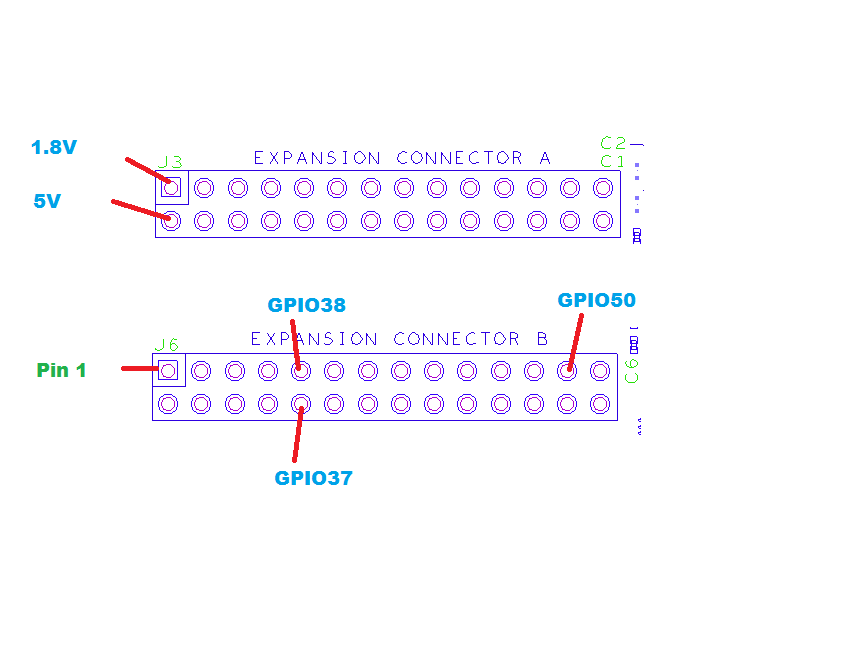
Open a file-socket to read or write from /sys/class/gpio/gpio38/value
- Make a folder, Test_IO_1
- Copy these two files to the new folder
- run make
- you should have Test_IO_1.0 and Test_IO_1
- type sudo ./Test_IO_1
- monitor GPIO38 with a scope, multimeter or a LED
Use this image or PandaBoard datasheet to find the correct pin for GPIO38
Open a file-socket to read or write from /sys/class/gpio/gpio38/value
To Read:
rewind(fp);
fread(&read_value, sizeof(char), 1, fp);
To Write:
rewind(fp);
fwrite(&set_value, sizeof(char), 1, fp);
OK, How to modify device read/write permission on boot:
I found this tile /etc/mtab
is this the one?
Also, I found SPI stuff @
/sys/class/spi_master
There is spi1, spi2, spi3, spi4
References:
http://lxr.free-electrons.com/source/Documentation/gpio.txt
http://www.haifux.org/lectures/258/gpio_spi_i2c_userspace.pdf
https://www.kernel.org/doc/Documentation/spi/spi-summary
http://www.youtube.com/watch?v=fuEB0VCkslQ
http://comments.gmane.org/gmane.comp.embedded.pandaboard/9743
http://lxr.free-electrons.com/source/drivers/input/keyboard/gpio_keys.c
http://lxr.free-electrons.com/source/arch/arm/mach-u300/spi.c?v=2.6.34
http://elinux.org/BeagleBoard/SPI
http://www.egr.msu.edu/classes/ece480/capstone/fall12/group02/documents/Mark-Birdsall_App-Note.pdf
